Unleash

Unleash

  • Documentation
  • Deploy and manage
  • Integrations
  • Contribute
  • API
  • Enterprise
  • Help

›Advanced

Getting started

  • Introduction
  • Connect your SDK
  • Client SDK
  • Create a feature toggle
  • Activation Strategies
  • Control rollout
  • Projects
  • Unleash Context
  • Working with native apps
  • Working with single page apps

Working with the SDK

  • Java SDK
  • Node SDK
  • .net SDK
  • GO SDK
  • Python SDK
  • Ruby SDK

Addons framework

  • Addons Introduction
  • Webhook
  • Slack
  • Jira commenter

Advanced

  • Strategy Constraints
  • Custom Activation Strategy
  • Feature Toggle Types
  • Feature Toggle Variants
  • Archived toggles
  • The audit log
  • API Access
  • Tagging Features

Archived toggles

In unleash you may choose to "archive" a feature toggle when it is not needed anymore. You do this by clicking the "Archive" button on the feature toggle details view. By archiving a feature toggle it will not be available to Client SDKs anymore.
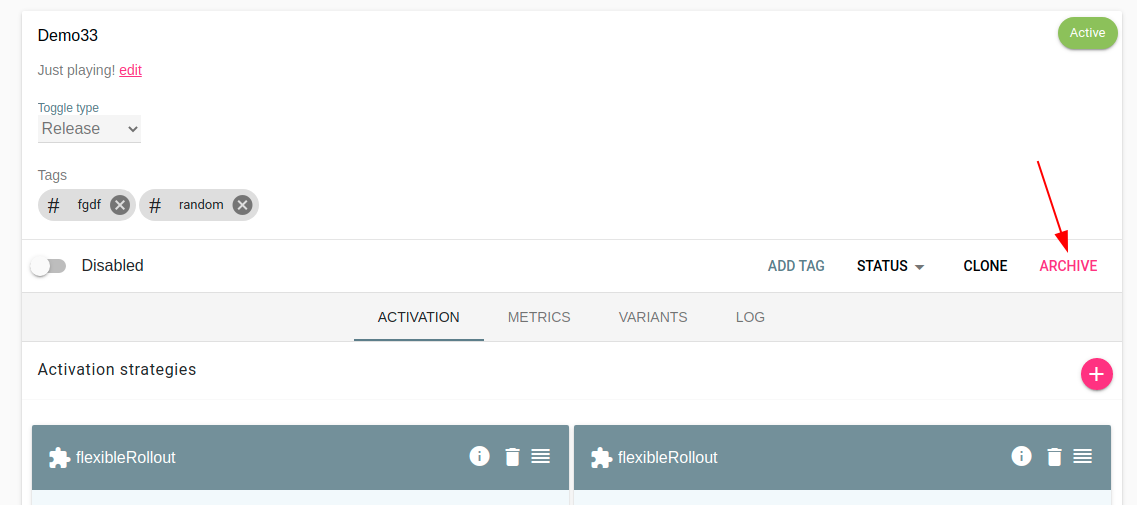
Archive Toggle.

You will not be able to "fully delete a feature toggle". The reason for this is to avoid old toggles suddenly "waking up again". This could, in worst case, re-activate old functionality in code where the use of the feature toggle has not been cleaned up yet.

Reviving a feature toggle

If you want to re-use a feature toggle which has been archived you may revive in from the archive. You do that by clicking the "revive icon". Please not that revived toggles will be "disabled" when they are active again.
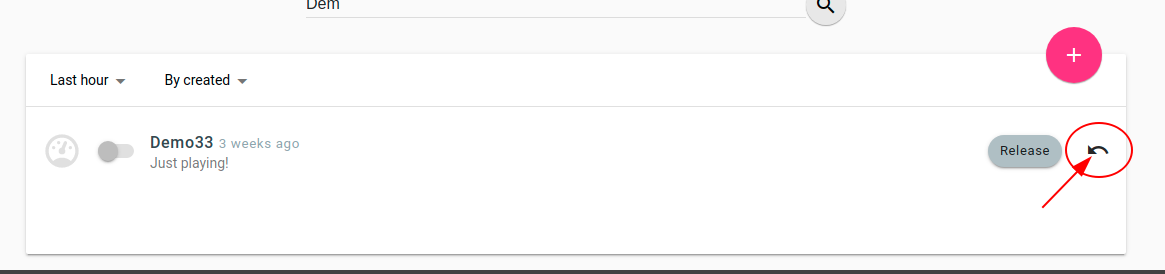
Revive Toggle.

← Feature Toggle VariantsThe audit log →
  • Reviving a feature toggle
Unleash
Docs
Getting StartedSecuring UnleashAPI Reference
Community
User ShowcaseSlack communityUnleash-hosted.comTwitter
More
GitHubStar